Let's face it: every sysadmin knows they should have backups, but most of us have that one server running on a wing and a prayer. The truth is, data loss isn't a matter of if — it's a matter of when. A failed disk, an accidental `rm -rf`, a ransomware attack, or even a corrupted database can turn your day upside down in seconds.
This guide walks through three battle-tested Linux backup tools — rsync, Borg Backup, and restic — and shows you how to build a backup pipeline that actually works. Not just a script that runs and dumps files somewhere, but a real strategy with deduplication, encryption, automation, and recovery verification.
Why You Need More Than a Tar Ball
Throwing a quick `tar -czf backup.tar.gz /important/stuff` and calling it a day works for personal projects, but it won't cut it in production. Here's why:
- No incremental backups — Every tar is a full backup, wasting storage and bandwidth
- No deduplication — Store the same file ten times, and you pay for it ten times
- No encryption — Your tar ball sits on disk or in cloud storage as plain data
- No corruption detection — A single flipped bit can silently corrupt your archive
Modern backup tools solve all of these problems. The trick is choosing the right tool for the job.
Tool 1: rsync — The Old Reliable
rsync has been a sysadmin staple for decades, and for good reason. It's fast, widely available on every Linux distribution, and incredibly flexible.
What rsync Does Well
rsync syncs files between two locations — local or remote — by transferring only the differences. Here's the classic pattern for a remote backup:
```bash
rsync -avz --delete /data/ user@backup-server:/backups/data/
```
Flags in plain English:
- `-a` — Archive mode (preserves permissions, timestamps, ownership)
- `-v` — Verbose (show what's being copied)
- `-z` — Compress during transfer (saves bandwidth)
- `--delete` — Remove files on the destination that were deleted on the source
Building a Daily Snapshot System with rsync
The real power of rsync shines when you combine it with hard links for snapshot-style backups. The popular `rsnapshot` tool and many homegrown scripts use this pattern:
```bash
#!/bin/bash
BACKUP_DIR="/backups/data"
SNAPSHOTDIR="$BACKUPDIR/$(date +%Y-%m-%d)"
LATESTLINK="$BACKUPDIR/latest"
Step 1: Create a hard-link copy of the latest snapshot
if [ -d "$LATEST_LINK" ]; then cp -al "$LATESTLINK" "$SNAPSHOTDIR" fiStep 2: rsync changed files into the new snapshot
rsync -avz --delete /data/ "$SNAPSHOT_DIR/"Step 3: Update the latest link
rm -f "$LATEST_LINK" ln -s "$SNAPSHOTDIR" "$LATESTLINK" ```The magic is in `cp -al` — it creates a copy using hard links. Files that haven't changed just get another directory entry pointing to the same inode. Changing a file creates a new inode for that file only. The result: each snapshot looks like a full backup but uses almost no extra space for unchanged files.
When to Use rsync
- Simple file-level backups where you want readable, immediate access to files
- Syncing to offline media (external drives, NFS mounts)
- Incremental transfers over SSH to remote servers
- Quick, one-off data migrations
Limitations
- No built-in encryption (relies on SSH)
- No block-level deduplication across snapshots
- No compression at rest (only during transfer with `-z`)
- Manual pruning — you manage old snapshots yourself
Tool 2: Borg Backup — Deduplication Done Right
Borg Backup takes the rsync idea and supercharges it with content-defined chunking and true deduplication. It splits files into variable-sized chunks, hashes each chunk, and stores each unique chunk only once — even across different machines.
Getting Started with Borg
```bash
Install Borg on Debian/Ubuntu
apt install borgbackup
Initialize a repository
borg init --encryption=repokey /backups/borg-repoCreate a backup
borg create --stats --compression lz4 \ /backups/borg-repo::data-$(date +%Y-%m-%d) \ /data/ ```The compression flag `lz4` is extremely fast — faster than not compressing in many cases because the CPU spends less time compressing than it would waiting for disk I/O on uncompressed data.
What Makes Borg Special
Deduplication across backups: Borg stores chunks globally across the entire repository. If you back up the same 100 GB database every day and only 500 MB changes, each new backup stores roughly 500 MB — not 100 GB.
Authenticated encryption: Borg uses authenticated encryption (AES-OCB or AES-CTR + HMAC-SHA256) so you know your data hasn't been tampered with.
Remote backups over SSH: Borg supports remote repositories natively:
```bash
borg create --stats \
user@backup-server:/backups/borg-repo::data-$(date +%Y-%m-%d) \
/data/
```
Pruning made simple:
```bash
borg prune --keep-daily 7 --keep-weekly 4 --keep-monthly 6 \
/backups/borg-repo
```
Borg in Practice — A Production Setup
```bash
#!/bin/bash
REPO="/backups/borg-repo"
export BORG_PASSPHRASE="your-secure-passphrase"
Create backup
borg create --stats --compression auto,lzma,6 \ "$REPO::server-$(date +%Y-%m-%d_%H%M)" \ /etc /var/lib /home \ --exclude '/home/*/.cache' \ --exclude '*.log'Prune old backups
borg prune "$REPO" \ --keep-daily 7 \ --keep-weekly 4 \ --keep-monthly 6 \ --keep-yearly 2Compact the repository (reclaims space from deleted archives)
borg compact "$REPO" ```When to Use Borg
- Large datasets with lots of repetitive data (backup servers, VM images)
- Long-term archival where storage efficiency matters
- Environments where you need strong encryption at rest
- Automated cron-based backup pipelines
Limitations
- Borg repositories are not human-readable — you need Borg to extract files
- Restoring a single file requires knowing the archive name
- Slightly higher complexity to set up compared to rsync
Tool 3: restic — Cloud-Native Backups Made Easy
restic is designed for the modern era where backups often live in cloud storage. It supports AWS S3, Backblaze B2, Google Cloud Storage, Azure Blob, OpenStack Swift, and even local or SFTP destinations — all with the same interface.
Getting Started with restic
```bash
Install restic
apt install restic
Initialize a repository on Backblaze B2
restic init --repo b2:bucket-name:/backupsCreate a backup
restic --repo b2:bucket-name:/backups \ backup /data/ ```What Makes restic Special
Multi-cloud support: restic speaks S3, B2, GCS, Azure, and local storage natively. Switching from one provider to another is a single command-line flag change.
Snapshots and mounts: restic can mount a backup as a FUSE filesystem, so you can browse and recover files without extracting:
```bash
restic mount /mnt/restore
```
This is a killer feature — your backup becomes a browseable directory tree organized by snapshot date.
Check and repair: restic includes a `check` command that verifies repository integrity and can repair certain types of corruption:
```bash
restic check --read-data
```
Forget and prune:
```bash
restic forget --keep-daily 7 --keep-weekly 5 --keep-monthly 12
restic prune
```
restic in Practice — Hybrid Local + Cloud
```bash
#!/bin/bash
export RESTIC_REPOSITORY="s3:s3.amazonaws.com/my-backup-bucket"
export RESTIC_PASSWORD="your-secure-password"
Back up critical directories
restic backup \ /etc /home /var/lib/mysql \ --exclude="/home/*/Downloads" \ --tag weeklyPrune old snapshots
restic forget \ --keep-daily 7 \ --keep-weekly 4 \ --keep-monthly 12 \ --pruneVerify integrity
restic check ```When to Use restic
- Cloud-native backup workflows
- Multi-cloud / hybrid setups
- Environments where you want to mount backups for easy browsing
- Teams that need a consistent backup interface across different storage backends
Limitations
- Slower deduplication than Borg for very large datasets
- Higher memory usage during backup operations
- No built-in compression (uses the underlying storage provider's compression)
Building Your Backup Pipeline: A Practical Architecture
Here's a proven architecture that combines all three tools for a defence-in-depth backup strategy:
```
Layer 1 — Local Snapshot (rsync)
Purpose: Immediate recovery, browseable files
Schedule: Hourly via cron
Location: Local disk or NAS mount
Layer 2 — Deduplicated Archive (Borg)
Purpose: Space-efficient long-term retention
Schedule: Daily via cron
Location: Dedicated backup server on the same network
Layer 3 — Cloud Offsite (restic)
Purpose: Disaster recovery, ransomware protection
Schedule: Daily, after Borg completes
Location: Backblaze B2 or AWS S3
```
Sample cron Schedule
```
/etc/cron.d/backup-pipeline
Hourly rsync snapshot (keep 24 hours)
0 root /usr/local/bin/rsync-snapshot.shDaily Borg backup (keep 7 daily, 4 weekly, 6 monthly)
0 2 * root /usr/local/bin/borg-backup.shDaily restic to cloud (keep 30 daily, 12 monthly)
0 4 * root /usr/local/bin/restic-cloud.sh ```The Golden Rule: Test Your Restores
This cannot be emphasised enough. A backup that hasn't been tested isn't a backup — it's a hope.
Set a monthly calendar reminder to:
- Restore a random file from each backup layer
- Time how long a full restore would take
- Verify database dumps by importing them into a test instance
- Check that encryption keys still work
The worst time to discover your backup is broken is when you need it most.
Conclusion
There's no single "best" backup tool — each serves a different purpose. rsync gives you fast, browsable snapshots with minimal overhead. Borg delivers space-efficient, encrypted archives with world-class deduplication. restic brings cloud-native flexibility with the ability to mount backups as filesystems.
The winning strategy is to use them together. rsync for local speed and immediate access, Borg for efficient archival, and restic for offsite cloud protection. Automate the pipeline, encrypt everything, and test your restores monthly. A smart sysadmin doesn't just back up — they verify.
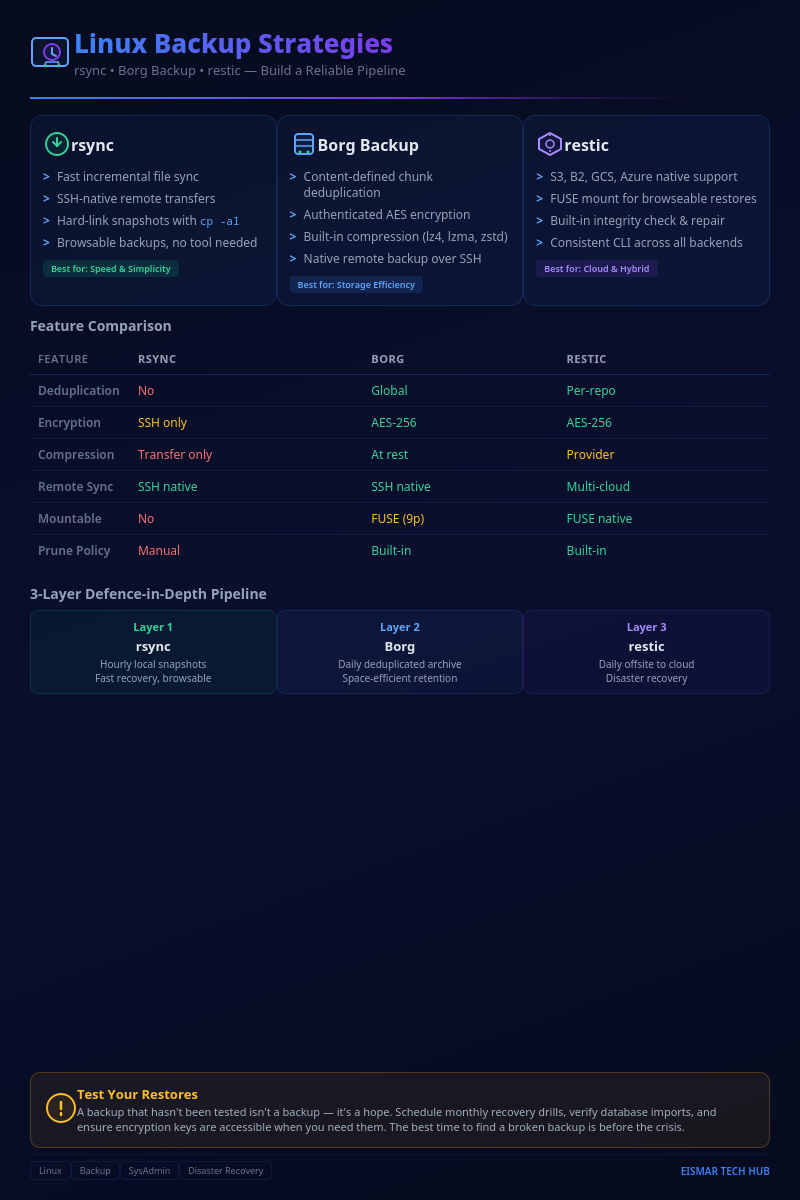
Infographic: Linux Backup Strategies

💬 0 Comments