If you run more than one web application on a single server, you've probably hit the same wall: every app wants port 80 and 443, they argue over certificates, and the moment one of them has a slow day, it drags everything else down with it. The classic sysadmin answer to this mess is a reverse proxy — and Nginx is the tool most of the Linux world reaches for first.
Here's the thing: a reverse proxy isn't just a traffic cop. Done right, it becomes your server's traffic control center — handling TLS certificates in one place, routing requests to the right backend, caching static assets, load-balancing across multiple app instances, and giving you a single choke point for security headers and access control. Let's break down how it works, how to set it up properly, and the pitfalls that catch most people out.
What Is a Reverse Proxy (and Why Do You Need One)?
A reverse proxy sits in front of your backend servers and forwards client requests to them. When a visitor hits `https://app.example.com`, the proxy terminates the connection, decides which backend should handle it (based on hostname, path, or headers), forwards the request, and streams the response back.
This is different from a forward proxy, which sits in front of clients (like a corporate web filter). The reverse proxy is invisible to the end user — they just see one clean URL.
Why run one? Five big reasons:
| Reason | What it gives you |
|---|---|
| TLS in one place | One certificate per domain, terminated at the proxy. Backends can stay on plain HTTP internally. |
| Port conservation | Many apps on one server, all reachable via 80/443 without port-number URLs. |
| Load balancing | Distribute traffic across multiple backend instances with built-in health checks. |
| Caching & compression | Offload static files and compress responses before they hit the wire. |
| Security choke point | Rate limiting, IP allowlists, security headers, and WAF-style rules in one spot. |
If your architecture has even two web apps on one box — say, a blog and an API — a reverse proxy is the difference between a clean setup and a ticking time bomb of port conflicts.
Setting Up Nginx as a Reverse Proxy
Nginx is almost certainly in your distro's repositories. On Debian/Ubuntu:
```bash
sudo apt update && sudo apt install -y nginx
```
The core concept is the server block (virtual host). Here's a minimal reverse proxy config that routes `app.example.com` to a backend listening on `127.0.0.1:3000`:
```nginx
server {
listen 80;
server_name app.example.com;
location / {
proxy_pass http://127.0.0.1:3000;
proxysetheader Host $host;
proxysetheader X-Real-IP $remote_addr;
proxysetheader X-Forwarded-For $proxyaddxforwardedfor;
proxysetheader X-Forwarded-Proto $scheme;
}
}
```
The three lines that matter most:
- `proxy_pass` — the backend address. Use `127.0.0.1` not `localhost` to avoid an accidental IPv6/`::1` resolution mismatch.
- `proxysetheader Host $host` — passes the original hostname so the backend knows which app it is.
- `X-Forwarded-*` headers — tell the backend the real client IP and whether the original request was HTTPS. Do not skip these — otherwise every log line in your app will show `127.0.0.1` and rate-limiters will throttle everyone as one user.
Test the config and reload:
```bash
sudo nginx -t # syntax check — always run this first
sudo systemctl reload nginx
```
`nginx -t` before every reload is a habit that will save you from locking yourself out of a broken config.
TLS Termination with Let's Encrypt
The biggest win of a reverse proxy is centralizing TLS. You get certificates once, at the proxy, and the backend never has to think about encryption. With Certbot, this is nearly automatic:
```bash
sudo apt install -y certbot python3-certbot-nginx
sudo certbot --nginx -d app.example.com -d www.app.example.com
```
Certbot edits your server block, installs the certificate, and sets up auto-renewal via a systemd timer. Verify the renewal chain works:
```bash
sudo systemctl status certbot.timer
sudo certbot renew --dry-run
```
A few TLS hardening touches worth adding while you're in there:
```nginx
ssl_protocols TLSv1.2 TLSv1.3;
ssl_ciphers ECDHE-ECDSA-AES128-GCM-SHA256:ECDHE-RSA-AES128-GCM-SHA256:ECDHE-ECDSA-AES256-GCM-SHA384:ECDHE-RSA-AES256-GCM-SHA384;
sslpreferserver_ciphers off;
```
Test your setup with an external scanner — `sslscan` or Qualys SSL Labs will confirm you're not serving weak ciphers. And remember: redirect all HTTP traffic to HTTPS with a simple `return 301 https://$host$request_uri;` block on port 80 (Certbot does this for you by default).
Beyond the Basics: Caching, Load Balancing & WebSockets
Once the basic proxy works, you can unlock serious performance. Three upgrades make the biggest difference:
1. Static asset caching. Nginx can serve and cache static files directly, bypassing your backend entirely:
```nginx
location ~* \.(js|css|png|jpg|svg|woff2)$ {
expires 30d;
add_header Cache-Control "public, immutable";
proxy_pass http://127.0.0.1:3000;
}
```
2. Load balancing across backends. Multiple app instances? Use an `upstream` block:
```nginx
upstream app_backend {
least_conn;
server 127.0.0.1:3001 maxfails=3 failtimeout=30s;
server 127.0.0.1:3002 maxfails=3 failtimeout=30s;
}
server {
listen 443 ssl;
server_name app.example.com;
# ... ssl config ...
location / {
proxypass http://appbackend;
}
}
```
Nginx automatically stops sending traffic to a backend that fails health checks — a poor man's high availability that costs nothing.
3. WebSocket support. For real-time apps (chat, dashboards, live logs), you need two extra headers or the upgrade will silently fail:
```nginx
location /ws {
proxy_pass http://127.0.0.1:3000;
proxyhttpversion 1.1;
proxysetheader Upgrade $http_upgrade;
proxysetheader Connection "upgrade";
proxyreadtimeout 3600s;
}
```
Without the `Upgrade`/`Connection` headers, WebSocket clients connect then drop immediately — one of the most confusing "works locally, broken in production" bugs there is.
Common Pitfalls & Troubleshooting
After years of proxying, these are the traps I see sysadmins hit most:
- `proxypass` without a trailing slash. `proxypass http://backend;` vs `proxy_pass http://backend/;` changes path handling completely. The trailing-slash version strips the matching location prefix — get this wrong and your app's asset URLs break mysteriously.
- Backend IP logging. If your app logs `127.0.0.1` for every visitor, the `X-Forwarded-For` headers are missing or your app isn't configured to trust them. Also set `realipheader X-Forwarded-For` with a `setrealip_from` list so Nginx's own logs show real clients.
- Timeouts on slow endpoints. Nginx's default `proxyreadtimeout` is 60s. Long-running requests (uploads, exports, AI inference) will get cut off — raise it per-location: `proxyreadtimeout 300s;`.
- 413 Request Entity Too Large. Default `clientmaxbodysize` is 1MB. The first time a user uploads a 50MB file, they'll get a confusing 413 — set `clientmaxbodysize 100m;` at the server level.
- Debugging with the right tools. When something breaks: `sudo nginx -t` for syntax, `sudo journalctl -u nginx -f` for runtime errors, and `curl -v` against the proxy to see exactly what headers the backend receives.
Conclusion
A reverse proxy isn't a luxury — for any multi-app server it's the difference between chaos and control. Nginx gives you TLS termination in one place, clean URLs, load balancing, caching, and a single security choke point, all with config that fits on one screen. Start with the minimal server block, add Certbot for TLS, then layer on caching, balancing, and WebSocket support as your apps demand it. A smart operator makes informed decisions — and routing every request through a well-configured Nginx is one of the smartest infrastructure decisions you can make.
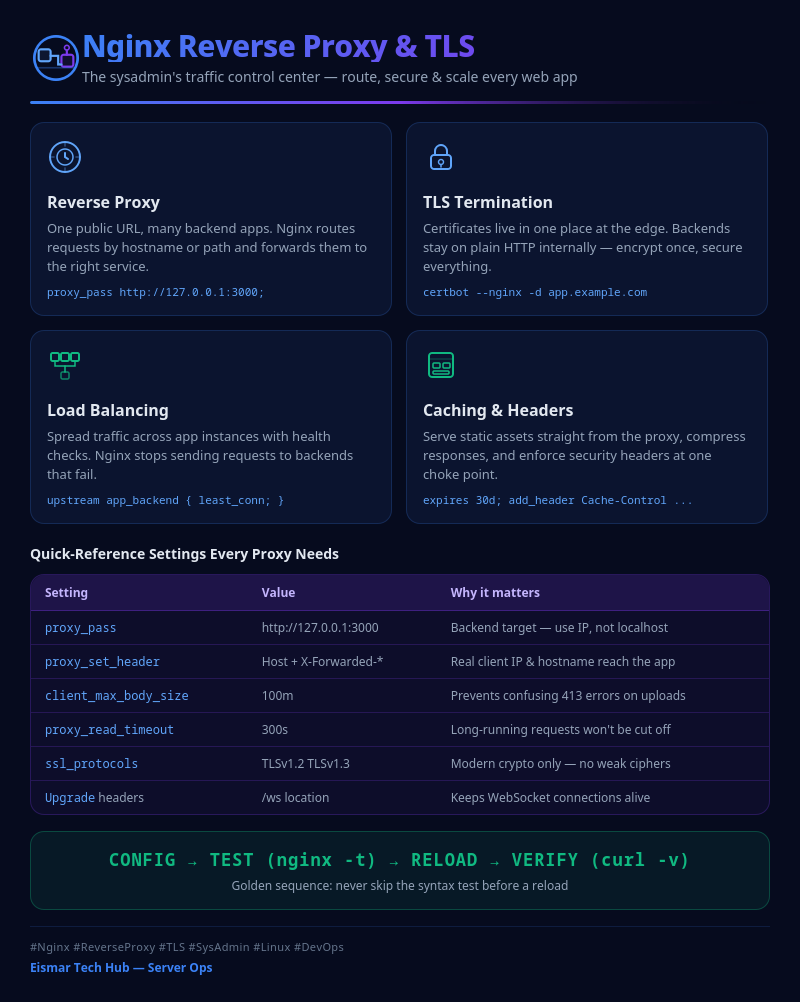
Infographic: Nginx Reverse Proxy & TLS

💬 0 Comments