You have just deployed a web app to a fresh RHEL box. The directory is owned by `nginx:nginx`, the permissions are `755`, the config is byte-for-byte identical to the Ubuntu server next to it — and yet every request returns 403 Forbidden. You escalate to `chmod -R 777`, restart the service, and nothing changes. The error log says `Permission denied` for a file that is world-readable.
Welcome to Mandatory Access Control. What you are fighting is not Unix permissions at all — it is SELinux doing exactly what it was designed to do, and refusing to trust your application because its file labels are wrong.
This is the single most common source of "impossible" permission errors on enterprise Linux, and it is also the easiest to misdiagnose. This guide covers how MAC actually works, how SELinux and AppArmor differ, and a repeatable four-command workflow for turning a denial into a correct, permanent fix — without ever reaching for `setenforce 0`.
The Problem: Permissions That Look Perfect
Classic Unix permissions are discretionary. That word matters. Under Discretionary Access Control (DAC), the owner of a file decides who gets access. If the owner sets `777`, everyone gets access, and the kernel politely complies. The security model trusts users to make good decisions.
That model breaks down in three familiar scenarios:
- A compromised service. Your web server has a bug that lets an attacker execute code. Under DAC, that code runs with the web server's UID — and can read or write everything that UID can touch, including config files, other sites' data, and log directories.
- An over-permissive quick fix. `chmod 777` is the duct tape of our industry. Once it is applied, the file is exposed to every account on the box, forever.
- A misconfigured daemon. A service that technically could read a file ends up needing access it was never intended to have. Nothing in the DAC model notices.
Mandatory Access Control closes that gap by adding a second, independent gate. Under MAC, a system-wide policy — written by the distribution, the vendor, or you — declares exactly which process may touch which resource. An unprivileged user cannot override it. Root cannot casually override it either. It is mandatory, not discretionary.
Two Gates, Not One: How the Kernel Checks Access
The critical mental model for troubleshooting is that both gates must pass. When a process opens a file, the kernel evaluates in order:
- DAC check — does the process's UID/GID match the file's mode bits?
- MAC check — does the loaded security policy allow this process to access this object?
If DAC denies, you get the classic `Permission denied` and SELinux is never even consulted. If DAC allows but MAC denies, you also get `Permission denied` — which is precisely why these errors are so confusing. The Unix permissions look right, because they are right. The second gate is what is closed.
| Aspect | DAC (standard Unix) | MAC (SELinux / AppArmor) |
|---|---|---|
| Who sets policy | File owner | System-wide security policy |
| Can a user override it | Yes (they own the file) | No — not even root, casually |
| Checked | After the process's UID matches | After DAC passes |
| Typical denial | `EACCES` on mode bits | `AVC denied` in audit log |
| Granularity | User, group, other | Per-process, per-file-label, per-operation |
| Purpose | Discretionary sharing | Containment of compromised services |
SELinux: Labels, Types, and Contexts
SELinux was developed by the NSA and merged into the mainline kernel in 2003. It is the default on RHEL, CentOS, Rocky, AlmaLinux, Fedora, and Android — which means if you administer enterprise Linux, this is the flavour you will meet.
SELinux is label-based. Every process and every file carries a security context that looks like this:
```text
systemu:objectr:httpdsyscontent_t:s0
^ ^ ^ ^
user role type level
```
The type is the field that does the real work. Most production SELinux is Type Enforcement: a policy rule says "the process running as type `httpdt` may read files labelled `httpdsyscontentt`." Nothing in that rule mentions usernames, so making a file readable by `nginx` under DAC changes nothing.
Inspect the labels on any system:
```bash
getenforce # Enforcing, Permissive, or Disabled
sestatus -v # Policy name, mode, loaded modules
ls -Z /var/www/html # File contexts
ps -Zaux | grep nginx # Process contexts
id -Z # Your own shell context
```
Three modes govern how strictly the policy is applied. Enforcing blocks and logs. Permissive logs but does not block — invaluable for building a policy on a production box. Disabled turns SELinux off entirely and requires a full filesystem relabel to re-enable, which is why disabling is almost always the wrong choice.
The label tools you actually need
Two commands cause most of the confusion here, so learn the difference now:
- `chcon` changes a label temporarily. It works immediately, and it is silently reverted the next time a relabel runs (`restorecon`, a package update, or a full filesystem relabel). It is a debugging tool, not a fix.
- `semanage fcontext` writes the label into the policy database, then `restorecon` applies it. It survives relabels and reboots. This is the correct fix.
The canonical example — telling SELinux that your custom web root is web content:
```bash
sudo semanage fcontext -a -t httpdsyscontent_t "/srv/myapp/www(/.*)?"
sudo restorecon -Rv /srv/myapp/www
```
The `/srv/myapp/www(/.)?` pattern is a regular expression matching the directory and everything beneath it* — without that suffix, you label the folder but none of its files, and the failure persists.
SELinux also ships booleans: pre-built, toggleable policy switches for the common "I need this service to do a little more" cases. Instead of writing custom policy, flip the switch:
```bash
getsebool -a | grep httpd # list httpd-related switches
sudo setsebool -P httpdcannetwork_connect on # -P makes it persistent across reboots
sudo setsebool -P httpdreaduser_content on
```
The `-P` flag is not optional decoration. Without it, the change evaporates on reboot and you will be back at this problem at 3 AM. When a boolean exists for your scenario, prefer it over custom policy — a boolean is a supported, maintainable policy decision; a hand-rolled module is technical debt.
AppArmor: Profiles and Paths
AppArmor takes a different approach to the same problem. Instead of labelling every file on disk, it defines per-program profiles that list the paths and capabilities a program may use. It is the default on Ubuntu, Debian, and SUSE, so most readers will have met it without noticing.
Because AppArmor works with paths rather than inode labels, it is considerably easier to read:
```text
/usr/sbin/nginx {
/etc/nginx/ r,
/var/log/nginx/*.log w,
/srv/www/ r,
}
```
No `ls -Z` archaeology, no policy modules — you read the profile file and you know what the program is allowed to do. The cost is that AppArmor is less complete than SELinux: a profile only constrains the programs someone wrote a profile for, whereas SELinux type enforcement is comprehensive and label integrity is checked across the whole filesystem.
Day-to-day AppArmor administration:
```bash
sudo aa-status # loaded profiles + modes
sudo aa-enforce /etc/apparmor.d/usr.sbin.nginx # enforce a profile
sudo aa-complain /etc/apparmor.d/usr.sbin.nginx # log-only (AppArmor's permissive)
sudo aa-genprof /usr/sbin/myapp # generate a profile by observing
sudo aa-logprof # review denials, build new rules
sudo apparmor_parser -r /etc/apparmor.d/usr.sbin.nginx # reload one profile
```
Switching a profile to complain mode is the AppArmor equivalent of `setenforce 0` — except it is scoped to one program instead of the entire system. That scoping is why it is a legitimate diagnostic step rather than a production risk: you get a clean list of everything the program wants to do, while every other profile stays enforced.
Diagnosing a Denial: The Four-Command Workflow
When a service fails with a permission error you cannot explain, run these in order.
1. Confirm which gate is closed.
```bash
getenforce # or: sudo aa-status
```
If the mode is `Disabled` or the profile is `unconfined`, you have a DAC problem and SELinux is a red herring. Check this first — it costs two seconds and prevents an hour of chasing the wrong subsystem.
2. Read the actual denial, not the application log. The application log tells you it failed. The security subsystem tells you why.
SELinux — where the AVC message lands:
```bash
sudo ausearch -m avc -ts recent
sudo ausearch -m avc -ts today | audit2why
sudo dmesg | grep -i -E "avc|selinux"
```
AppArmor — where the profile denial lands:
```bash
sudo dmesg | grep -i apparmor
sudo journalctl -k | grep apparmor
sudo aa-status --verbose
```
A denial line names the exact source type, target type, and operation that was refused:
```text
avc: denied { write } for pid=4821 comm="nginx"
name="cache" scontext=systemu:systemr:httpd_t:s0
tcontext=systemu:objectr:var_t:s0 tclass=dir
```
That single line tells you everything: `httpdt` wanted to `write` to a directory labelled `vart`. The fix is either to relabel the target as something `httpd_t` may write, or to extend policy.
3. Classify and fix. Three fixes cover the overwhelming majority of cases:
- Wrong file label → `semanage fcontext` + `restorecon` (SELinux), or a profile rule (AppArmor).
- Program needs a standard extra capability → a boolean, e.g. `httpdcannetwork_connect`.
- Program binds a non-standard port → `sudo semanage port -a -t httpportt -p tcp 8080`.
4. Re-test and confirm silence. Re-run the failing operation, then re-check the audit log. A fix that has not been verified against the log is a guess.
Only if none of the three apply should you generate a custom module:
```bash
sudo ausearch -c 'nginx' --raw | audit2allow -M my-nginx
sudo semodule -i my-nginx.pp
```
`audit2allow` builds policy that permits everything it saw — including anything a compromised process did. Treat it as a last resort, review what it generates, and never run it blindly on a box that might already be breached.
Five Denials You Will Meet in the Wild
| Symptom | Cause | Correct fix |
|---|---|---|
| 403 on files under a custom docroot | Files labelled `defaultt` or `vart`, not `httpdsyscontentt` | `semanage fcontext -a -t httpdsyscontentt "/srv/web(/.)?"` then `restorecon -Rv` |
| Web app cannot connect to a backend API | `httpdt` may not open outbound sockets by default | `setsebool -P httpdcannetworkconnect on` |
| Service fails to bind port 8080 | Ports are labelled; 8080 is not `httpportt` | `semanage port -a -t httpportt -p tcp 8080` |
| File copied then moved into docroot fails to serve | `mv` preserves the old context; `cp` inherits the target* directory's context | `restorecon -Rv` on the destination after the move |
| Uploaded files invisible to the app | Upload directory labelled for a different type | Label the upload dir for the app's write type (e.g. `httpdsysrwcontentt`) |
The `mv` versus `cp` asymmetry in that table is the trap that catches experienced admins. `cp` creates a new inode, and new inodes inherit the context of the directory they are created in — so `cp` often "works". `mv` keeps the existing inode and therefore the existing label, so files dragged in from `/home` or `/tmp` arrive carrying the wrong type and are refused. The same is true for files created by root in `/tmp` and then handed to a service. When a serving failure follows a file move, relabel before you investigate anything else.
The Golden Rules
Four habits keep MAC from becoming a source of outages:
Never disable it. `SELINUX=disabled` in `/etc/selinux/config` requires a full filesystem relabel to undo, and it removes the containment layer that protects every other service on the host. If you need visibility, use permissive mode or complain mode — both log without blocking, and both are reversible in seconds.
Labels follow the policy, not the permission bits. When a file "should" be readable and is not, check `ls -Z` before you check `ls -l`. On a MAC-enabled system, the permission bits were never the whole story.
Fix at the policy layer, not the file layer. `chcon` and manual `chmod` are temporary; `semanage fcontext` + `restorecon` and `setsebool -P` are permanent. If your fix disappears after a `dnf update`, you used the wrong tool.
Read the audit log, not just the app log. The application tells you that it failed. The AVC message tells you which route to take. Every extra minute spent guessing in the application log is a minute you could have spent reading the actual answer.
Conclusion
Mandatory Access Control is not a hurdle bolted onto Linux to make your Tuesday harder. It is the layer that means a compromised web app cannot rewrite your SSH keys, pivot to your database, or read another customer's files — even if the attacker obtains a shell. That protection only works if it stays enabled, which means the sysadmin's job is not to turn it off, but to understand it well enough to grant exactly the access a service legitimately needs.
Learn three things and you will handle the vast majority of denials calmly: the difference between DAC and MAC, the difference between `chcon` and `semanage fcontext`, and the four-command diagnostic sequence. Everything else — booleans, port labelling, custom modules — is a variation on the same theme.
A denial is not an obstacle. It is the kernel telling you precisely what it did not understand about your intent. Read the AVC, fix it at the policy layer, verify, and move on — with the second gate still firmly closed against everyone who should not be there.
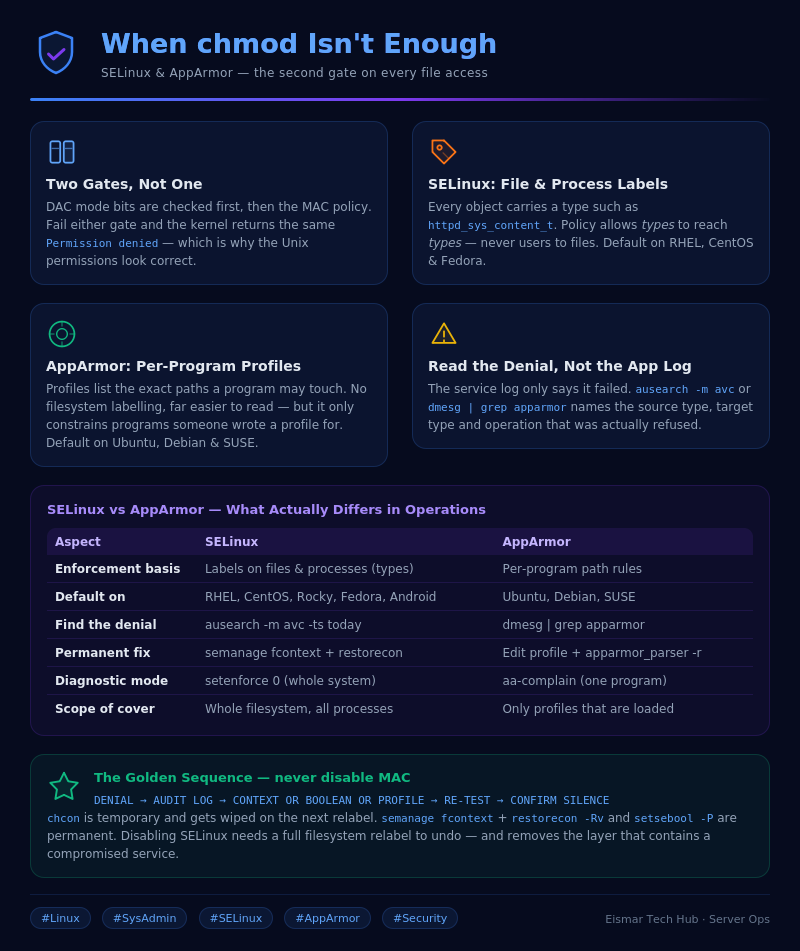
Infographic: When chmod Isn't Enough — SELinux & AppArmor for SysAdmins

💬 0 Comments