There is a moment every sysadmin knows too well. You SSH into a server, run `df -h`, and there it is: a partition sitting at 98% full while another disk in the same machine has hundreds of gigabytes of free space doing nothing. Your first instinct is to shuffle data around with symlinks, or worse, schedule a maintenance window to repartition the disk — which means downtime, risk, and a very late night. If this scenario sounds familiar, it is time to stop fighting fixed partitions and start using the Logical Volume Manager, better known as LVM.
LVM is the storage layer that sits between your physical disks and your filesystems, and it gives you something plain partitions never can: flexibility. With LVM you can grow a filesystem while the server is running, shrink one when you over-provisioned, pool several disks into one big logical volume, and even take instant snapshots for safe backups. In this guide, we will break down how LVM works, walk through the commands to build your first setup, and cover the best practices that keep production storage boring and reliable.
Why Plain Partitions Hurt
To appreciate LVM, you have to understand the problem it solves. When you install Linux on a raw disk, you create partitions with `fdisk` or `parted`. Each partition has a fixed start and end point on the disk, and that geometry is burned into the partition table. The filesystem inside that partition is then created with a size it cannot exceed.
Here is the thing about fixed partitions: they do not adapt. If `/home` fills up, you cannot just borrow space from `/var` — they are separate islands on the same disk. The classic workarounds are all ugly:
- Symlink tricks — moving a directory to another disk and linking it back. It works, but it spreads your data across disks in ways that are hard to track and easy to break.
- Repartitioning — backing everything up, deleting the partition, recreating it bigger, and restoring. This means hours of downtime and a real risk of data loss if the backup is bad.
- Over-provisioning — making every partition huge "just in case." This wastes storage and delays the problem rather than solving it.
A server with plain partitions is a server where storage decisions made on day one keep haunting you for years. LVM changes that by adding a logical layer between disks and filesystems, so the physical layout can change without touching your data.
The LVM Three-Layer Model
LVM works with three building blocks, and understanding them is 80 percent of understanding LVM.
Physical Volumes (PV)
A physical volume is a disk or partition that LVM has claimed for itself. When you run `pvcreate /dev/sdb`, you are telling LVM: "this device is mine to manage." LVM writes a small metadata header at the start of the device so it can recognise it later. You can have as many PVs as you have disks.
Volume Groups (VG)
A volume group is a pool of storage created by combining one or more physical volumes. Think of it as one giant virtual disk assembled from however many physical disks you want to throw into it. `vgcreate vg_data /dev/sdb /dev/sdc` puts both disks into a single pool. If you add a third disk later, you can extend the group with `vgextend` — the pool grows while the server keeps running.
Logical Volumes (LV)
A logical volume is a slice of that pool, and this is what actually holds a filesystem. Logical volumes look and behave like partitions — they appear as `/dev/vgdata/lvwww` or `/dev/mapper/vgdata-lvwww` — but unlike partitions, they can be resized at will. You carve LVs out of the pool with `lvcreate`, and because the pool is shared, unused space in one LV is never wasted: it is simply available for the next LV you create.
The mental model is simple: PVs are the bricks, the VG is the wall, and LVs are the rooms. Move bricks around, add new ones, or redraw the room boundaries — the wall keeps standing.
Building Your First LVM Setup
Enough theory. Let us build an LVM setup from scratch on a server with a fresh disk at `/dev/sdb`. The whole workflow is six commands, and none of them require a reboot.
```bash
1. Mark the disk as a physical volume
pvcreate /dev/sdb
2. Create a volume group named vg_data
vgcreate vg_data /dev/sdb3. Carve out a 100 GB logical volume named lv_www
lvcreate -L 100G -n lvwww vgdata4. Put a filesystem on it
mkfs.ext4 /dev/vgdata/lvwww5. Mount it
mkdir -p /srv/www mount /dev/vgdata/lvwww /srv/www6. Make the mount permanent (use the UUID from blkid)
blkid /dev/vgdata/lvwwwAdd to /etc/fstab: UUID=xxxx-xxxx /srv/www ext4 defaults 0 2
```Notice what happened: we created a "partition" without ever touching the partition table, without deleting anything, and without rebooting. If `lv_www` runs out of space next month, the fix is two commands while the server stays online:
```bash
Add another 50 GB from the pool
lvextend -L +50G /dev/vgdata/lvwww
Grow the filesystem to match (ext4)
resize2fs /dev/vgdata/lvwww ```That is it. `/srv/www` is now 150 GB and the applications on it never noticed a thing. For XFS filesystems the resize command is `xfs_growfs /srv/www` instead — and note that XFS can grow but cannot shrink, a fact we will come back to in the pitfalls section.
Growing and Shrinking Without Downtime
The ability to resize live is the headline feature of LVM, and it deserves a little more detail.
Growing a logical volume is always safe and always online. As long as your volume group has free space — check with `vgdisplay` — you can extend any LV with `lvextend`, then grow the filesystem with `resize2fs` (ext4) or `xfs_growfs` (XFS). The order matters: filesystem first or LV first? For ext4, `resize2fs` can actually resize the filesystem and the LV in one step with `lvextend -r`, which saves you from the classic mistake of extending the LV and forgetting the filesystem — a mistake that leaves the LV bigger on disk than the filesystem can use.
Shrinking is the risky direction. You must shrink the filesystem first, then the LV — never the other way around. For ext4 the sequence is:
```bash
1. Unmount the volume (shrink needs the FS offline)
umount /srv/www
2. Check the filesystem first — mandatory before shrinking
e2fsck -f /dev/vgdata/lvwww3. Shrink the filesystem to 80 GB
resize2fs /dev/vgdata/lvwww 80G4. Now shrink the LV to match
lvreduce -L 80G /dev/vgdata/lvwww5. Mount again
mount /srv/www ```XFS cannot be shrunk at all. If you build an XFS volume, the only way to reduce it is to back up, recreate, and restore. Choose your filesystem with that in mind: ext4 for volumes that might need to shrink, XFS for large volumes that will only ever grow.
Snapshots: The Sysadmin Superpower
If live resizing is the headline, snapshots are the plot twist. An LVM snapshot is a point-in-time copy of a logical volume that you create in seconds, and it costs almost nothing upfront because of how cleverly it works.
When you take a snapshot, LVM does not copy your data. It records the current state and then, as the original volume changes, it copies only the changed blocks into the snapshot area. The snapshot stays a consistent picture of the volume as it was the moment you created it. You can mount it, read from it, or back it up from it — all while production keeps running.
```bash
Create a snapshot of lv_db (thin on space — 10 GB snapshot area is fine)
lvcreate -L 10G -s -n lvdbsnap /dev/vgdata/lvdb
Mount the snapshot read-only for a consistent backup
mkdir -p /mnt/snap mount -o ro /dev/vgdata/lvdb_snap /mnt/snapBack up, then remove the snapshot
umount /mnt/snap lvremove /dev/vgdata/lvdb_snap ```Where do snapshots shine? Database backups. A `mysqldump` or `pg_dump` against a busy database can catch mid-transaction state, but a snapshot gives you a consistent image in seconds — then you can run the dump against the frozen snapshot without any lock contention on the live database. Snapshots are also fantastic for testing: snapshot a volume, apply a risky upgrade or config change, and if everything breaks, roll back to the snapshot instantly instead of restoring from a tape. Just remember that snapshots are not backups — they live on the same disks, so a disk failure takes out the original and its snapshot together.
Best Practices and Common Pitfalls
LVM is powerful, but power without discipline is how production storage disasters happen. Here are the rules that keep LVM setups healthy.
Always resize the filesystem after the LV. This is the number one LVM mistake. Extending the LV and forgetting `resize2fs` gives you a volume that looks bigger in `lvs` but still reports the old size in `df -h`. Use `lvextend -r` to resize both together.
Back up the LVM metadata. `vgcfgbackup` dumps the volume group configuration to a file. After a disk failure or an accidental `vgremove`, this file is what lets you restore the group structure. Run it after every change and store the output somewhere safe — it is tiny and could save your entire storage layout.
Monitor space at three levels. Watch `df -h` for filesystem usage, `lvs` for logical volume usage, and `vgdisplay` for pool capacity. A volume group that is 100 percent full blocks all extensions and snapshots in that group, even for volumes that still have headroom. Alert on VG free space before it hits zero — it is the single point of failure for everything in the pool.
Do not put LVM on removable or shared disks. USB drives, SAN LUNs presented to multiple hosts, and other devices that can appear and disappear are a bad home for PVs. LVM assumes it owns the device exclusively; sharing or unplugging it invites metadata corruption.
Respect the boot partition. If your root filesystem is on LVM, make sure GRUB can actually read it. Most modern distributions handle LVM-on-root at install time, but if you are converting an existing server, the boot partition (`/boot`) should stay on a plain partition that the bootloader can read without LVM support.
Layer RAID and LVM in the right order. Hardware RAID or mdadm RAID should sit below LVM — make the RAID array the physical volume, not the individual disks. That way LVM manages capacity across the whole array, and the array provides redundancy. Doing it the other way (LVM below RAID) gives you none of the benefits and all of the complexity.
Conclusion
LVM turns storage from a fixed, rigid constraint into a flexible resource you can manage while your servers keep running. The three-layer model — physical volumes pooled into volume groups, carved into logical volumes — is easy to grasp, and the payoff is huge: online resizing, instant snapshots, multi-disk pooling, and the end of the "out of space at 2 AM" emergency. Start with the six-command build we walked through, add `vgcfgbackup` to your habits, and never shrink an XFS volume. A smart operator makes informed decisions — and with LVM in your toolkit, storage decisions stop being emergencies and start being routine.
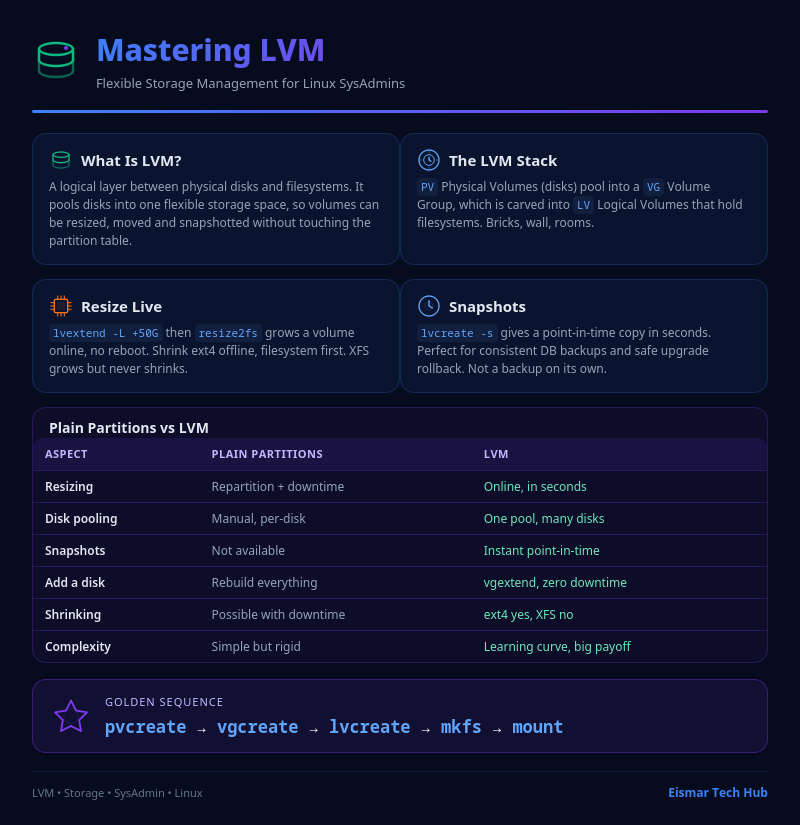
Infographic: Mastering LVM

💬 0 Comments