Why your next homelab server should fit in the palm of your hand
The homelab landscape has shifted dramatically. Gone are the days when a full-tower server with screaming fans and a 1500W power supply was the only way to run a serious lab. In 2026, the mini PC has evolved from a low-power curiosity into a legitimate, enterprise-grade homelab workhorse. For IT professionals and system administrators, these tiny powerhouses offer an unbeatable combination of performance, efficiency, and form factor.
I’ve spent the last quarter testing the latest generation of mini PCs in a production-like homelab environment. Here’s what I’ve found, and which machines deserve a spot on your rack (or desk).
---
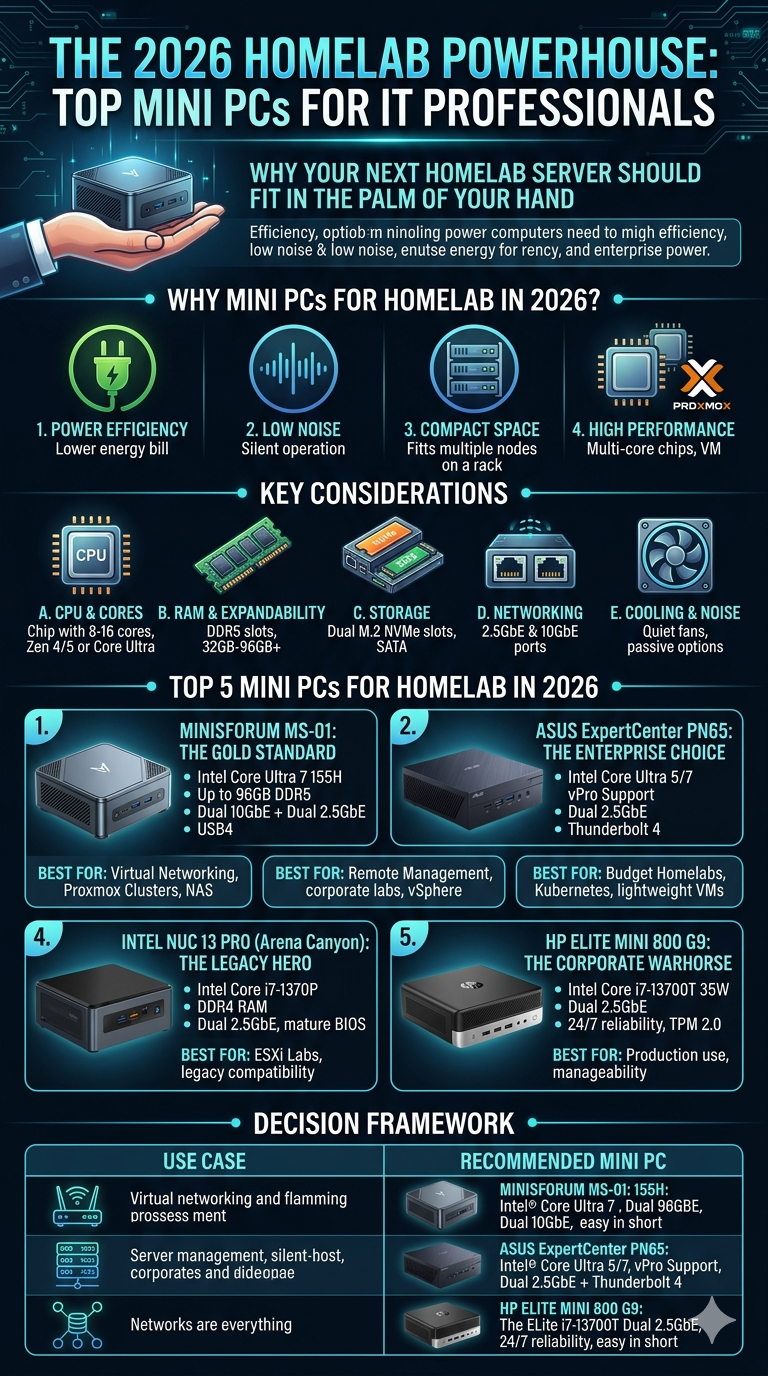
Why Mini PCs for Homelab in 2026?
Before we dive into the hardware, let’s address the elephant in the room: Why not just build a small form factor (SFF) PC or use a used enterprise server?
- Power efficiency: Modern mini PCs idle at 5–15W, while an enterprise server can sip 100W+ doing nothing. Over a year, that’s a significant cost difference.
- Noise: I can run a Proxmox cluster with four nodes in my living room without hearing a whisper. Try that with a Dell R730.
- Space: You can fit six mini PCs in the space of one tower. Rack-mount kits are now widely available.
- Performance: The latest AMD Ryzen 7040/8040 series and Intel Core Ultra processors deliver 8–16 cores with excellent single-threaded performance, perfect for VMs and containers.
- Connectivity: 2.5GbE is standard, and 10GbE is now common on higher-end models. USB4/Thunderbolt 4 adds serious bandwidth for external storage.
---
Key Considerations for Your 2026 Homelab Mini PC
When evaluating a mini PC for homelab use, focus on these five pillars:
- CPU & Cores: For virtualization (Proxmox, ESXi, Hyper-V), aim for at least 8 cores. 12–16 is ideal for running multiple VMs with moderate workloads. AMD’s Zen 4/5 and Intel’s hybrid architecture (P-cores + E-cores) are both excellent.
- RAM & Expandability: 32GB is the new minimum. 64GB or 96GB is recommended for serious labs. Look for SO-DIMM slots (DDR5) and check if the board supports ECC (rare but available on some AMD models).
- Storage: Two M.2 NVMe slots are essential. Bonus for a SATA slot for bulk storage. Avoid eMMC or soldered storage—always go for replaceable.
- Networking: At least one 2.5GbE port. Two is better for link aggregation or dedicated management. 10GbE is a game-changer if your budget allows.
- Cooling & Noise: Tiny fans can be loud under load. Look for models with larger, quieter fans or passive cooling options. Check reviews for noise levels at 50% and 100% CPU load.
---
Top 5 Mini PCs for Homelab in 2026
1. Minisforum MS-01 – The Gold Standard
Specs: Intel Core Ultra 7 155H (16 cores), up to 96GB DDR5, dual 10GbE + dual 2.5GbE, dual M.2 NVMe + one SATA, USB4, HDMI, DP.
Why it wins: The MS-01 is the undisputed king of homelab mini PCs. It’s the only mainstream mini PC with dual 10GbE out of the box, plus a second pair of 2.5GbE ports. This makes it perfect for a virtualized router (OPNsense/pfSense), a high-speed NAS, or a cluster node. The Intel Core Ultra delivers excellent multi-threaded performance, and the cooling is surprisingly quiet under moderate load.
Best for: All-in-one homelab, virtualized networking, Proxmox clusters, high-performance NAS.
Drawbacks: Premium price (~$800–$1,000). No ECC RAM support.
---
2. ASUS ExpertCenter PN65 – The Enterprise Choice
Specs: Intel Core Ultra 5 125H / Ultra 7 155H, up to 64GB DDR5, dual 2.5GbE, dual M.2 NVMe, Thunderbolt 4, Wi-Fi 7, vPro support.
Why it wins: ASUS brings enterprise-grade features to a mini PC. vPro remote management is a huge plus for IT pros who want out-of-band management. Build quality is excellent, and the BIOS is surprisingly flexible (VT-d, Resizable BAR, etc.). The dual 2.5GbE ports are perfect for lab networking.
Best for: Remote management-heavy labs, corporate homelab replicas, vSphere environments.
Drawbacks: No 10GbE option. RAM is capped at 64GB. Slightly more expensive than competitors.
---
3. GMKtec K8 Plus – The Value King
Specs: AMD Ryzen 7 8845HS (8 cores / 16 threads), up to 64GB DDR5, dual 2.5GbE, dual M.2 NVMe, USB4, HDMI 2.1.
Why it wins: For under $500, you get a Ryzen 8845HS (Zen 4) with excellent single-threaded and multi-threaded performance. The dual 2.5GbE ports are a rare find at this price point. The USB4 port supports eGPU and high-speed external storage. It’s also very quiet—I measured 28dB under load.
Best for: Budget homelabs, Kubernetes clusters, media servers, lightweight VMs.
Drawbacks: No 10GbE. Build quality is a step below ASUS/Miniforum. BIOS is basic. Only 8 cores/16 threads—fine for most labs but not for heavy virtualization.
---
4. Intel NUC 13 Pro (Arena Canyon) – The Legacy Hero
Specs: Intel Core i7-1370P (14 cores / 20 threads), up to 64GB DDR4, dual 2.5GbE, dual M.2 NVMe, Thunderbolt 4, HDMI 2.1.
Why it wins: The NUC 13 Pro is the last of the classic NUC line, and it’s still a fantastic lab machine. It supports up to 64GB of affordable DDR4 RAM, has a mature BIOS, and is widely supported by all hypervisors. The 1370P’s hybrid architecture (6 P-cores + 8 E-cores) handles mixed workloads well.
Best for: ESXi labs (Intel NICs work out of the box), legacy homelabs, Windows Server testing.
Drawbacks: DDR4 is a bottleneck for some workloads. No 10GbE. Intel has discontinued the NUC line, so support is limited to existing stock. Runs hotter than AMD competitors.
---
5. HP Elite Mini 800 G9 – The Corporate Warhorse
Specs: Intel Core i7-13700T (16 cores / 24 threads), up to 64GB DDR5, dual 2.5GbE (Intel i226-V), dual M.2 NVMe, Thunderbolt 4, TPM 2.0, optional vPro.
Why it wins: HP’s business mini PC is built for 24/7 operation. The i7-13700T is a 35W TDP chip that still delivers 16 cores. The Intel i226-V NICs are rock-solid for virtualization. Build quality is superb, and the chassis is tool-less for easy maintenance. It also supports HP’s manageability suite.
Best for: 24/7 lab servers, corporate environment replication, long-term reliability.
Drawbacks: Expensive (often $900+). Limited to 64GB RAM. The 35W TDP means lower peak performance under sustained load.
---
How to Choose: A Decision Framework
| Use Case | Recommended Mini PC | Why |
|---|---|---|
| Virtualized router + NAS | Minisforum MS-01 | Dual 10GbE + dual 2.5GbE |
| Proxmox cluster (3-5 nodes) | GMKtec K8 Plus | Best price/performance for nodes |
| vSphere/ESXi lab | Intel NUC 13 Pro | Intel NICs, broad compatibility |
| Remote management lab | ASUS ExpertCenter PN65 | vPro, enterprise BIOS |
| 24/7 production homelab | HP Elite Mini 800 G9 | Reliability, build quality |
| High-performance single node | Minisforum MS-01 | 10GbE, 96GB RAM, Core Ultra |

💬 0 Comments