If there's one networking concept that makes seasoned sysadmins nod knowingly and newcomers break into a cold sweat, it's subnetting. But here's the thing: subnetting isn't actually hard — it's just poorly explained most of the time. Once you understand the logic behind the math, it becomes second nature. In this guide, we'll strip away the jargon and walk through subnetting from the ground up, with real examples you can apply today.
Why Subnetting Matters
Every device on a network needs an IP address — that much is obvious. But in the early days of the internet, the original IP addressing scheme (classful addressing) was wildly inefficient. Organizations were handed entire Class A, B, or C address blocks regardless of how many devices they actually had. A company with 200 devices might get a Class B network supporting 65,000 hosts. Most of those addresses were wasted.
Subnetting solves this by allowing you to take a single network block and slice it into smaller, more manageable pieces. Think of it like dividing a large plot of land into neighbourhoods, each with its own street system. Instead of one giant chaotic city, you get organized zones that are easier to manage, secure, and troubleshoot.
The benefits are practical and immediate:
- Efficient IP usage — assign exactly the number of addresses each department or function needs
- Traffic isolation — broadcast traffic stays within each subnet instead of flooding the entire network
- Improved security — you can place firewalls and ACLs between subnets to control east-west traffic
- Simplified troubleshooting — a problem in one subnet rarely affects others
- Scalability — adding new segments doesn't require re-addressing the whole network
The Core Concept: The Subnet Mask
At its heart, subnetting is about answering one question: which part of an IP address identifies the network, and which part identifies the host?
An IPv4 address is 32 bits long — four octets of 8 bits each, written in dotted decimal notation like `192.168.1.0`. The subnet mask (or prefix length) tells you how many of those bits belong to the network portion.
Let's use the most common example: `255.255.255.0`, also written as `/24`.
```
192.168.1.0/24
```
The `/24` means the first 24 bits (three octets: `192.168.1`) are the network portion. The remaining 8 bits (the last octet: `.0`) are the host portion, giving you 256 possible addresses. Subtract the network address (all host bits zero) and the broadcast address (all host bits one), and you have 254 usable host addresses.
That's the foundation. Now let's slice it.
The Binary Method (You Only Need This Once)
The fastest way to understand subnetting is to think in binary for exactly five minutes. Here's all you need to know:
Each octet is 8 bits, with these decimal values:
```
128 | 64 | 32 | 16 | 8 | 4 | 2 | 1
```
When you "borrow" bits from the host portion to create subnets, each borrowed bit doubles the number of subnets and halves the number of hosts per subnet.
Example: Take `192.168.1.0/24` and borrow 2 bits. Your new prefix is `/26`.
- How many subnets? 2² = 4 subnets
- How many hosts per subnet? 2⁶ − 2 = 62 hosts (6 host bits remain, subtract network and broadcast)
The four subnets would be:
- `192.168.1.0/26` — hosts 1 through 62
- `192.168.1.64/26` — hosts 65 through 126
- `192.168.1.128/26` — hosts 129 through 190
- `192.168.1.192/26` — hosts 193 through 254
Notice the pattern? Each subnet starts at a multiple of 64 (the block size). The block size formula is simple: 256 ÷ number of subnets, or equivalently 2^(8 − borrowed bits).
A Practical Scenario
Let's make this real. You're setting up a small office network with three departments:
| Department | Devices | Requirement |
|---|---|---|
| Engineering | 50 hosts | Needs room to grow to 70 |
| Operations | 25 hosts | Needs room to grow to 40 |
| Guest Wi-Fi | 10 hosts | Isolated, no internal access |
You have a single `/24` block: `10.0.0.0/24`.
Step 1: Determine the smallest subnet that fits Engineering's growth requirement (70 hosts).
- 2ⁿ − 2 ≥ 70
- 2⁷ − 2 = 126 (7 host bits)
- That's a `/25` subnet (32 − 7 = 25)
So Engineering gets `10.0.0.0/25` — 126 usable hosts, plenty of room.
Step 2: Operations needs 40 hosts.
- 2⁶ − 2 = 62 (6 host bits)
- That's a `/26` subnet
Operations gets `10.0.0.128/26` — 62 usable hosts.
Step 3: Guest Wi-Fi needs 10 hosts.
- 2⁴ − 2 = 14 (4 host bits)
- That's a `/28` subnet
Guest Wi-Fi gets `10.0.0.192/28` — 14 usable hosts, perfect.
Wait — we have room left between `.192` and `.255`. The `/28` block is 16 addresses (`10.0.0.192` to `10.0.0.207`). That leaves `10.0.0.208` through `10.0.0.255` free for future expansion.
Step 4: Plan the routing.
Now configure your router/firewall with these three subnets on separate VLANs or interfaces:
- VLAN 10 — Engineering: `10.0.0.0/25`
- VLAN 20 — Operations: `10.0.0.128/26`
- VLAN 30 — Guest Wi-Fi: `10.0.0.192/28`
Add ACLs to block Guest Wi-Fi from accessing VLANs 10 and 20, and you have a clean, secure, and efficient network design.
Common Subnet Cheat Sheet (Memorize This)
| Prefix | Subnet Mask | Hosts per Subnet | Use Case |
|---|---|---|---|
| /30 | 255.255.255.252 | 2 | Point-to-point links |
| /29 | 255.255.255.248 | 6 | Small server clusters |
| /28 | 255.255.255.240 | 14 | Guest Wi-Fi, small VLANS |
| /27 | 255.255.255.224 | 30 | Branch offices |
| /26 | 255.255.255.192 | 62 | Medium departments |
| /25 | 255.255.255.128 | 126 | Large departments |
| /24 | 255.255.255.0 | 254 | Standard /24 (most common) |
| /23 | 255.255.254.0 | 510 | Two /24s combined |
| /22 | 255.255.252.0 | 1022 | Large site |
CIDR: Why You Should Forget Classful Addressing
Classful addressing (Class A = /8, Class B = /16, Class C = /24) died in 1993 when CIDR (Classless Inter-Domain Routing) was introduced. Yet many IT pros still think in classful terms.
CIDR lets you use any prefix length, not just /8, /16, or /24. This is what makes VLSM (Variable Length Subnet Masking) possible — you can mix different subnet sizes within the same network, like we did in the practical example above.
When designing a new network, always ask: "What's the smallest subnet that meets today's requirement plus 50% growth?" Then pick the next size up if you're unsure. It's always better to have a few unused addresses than to re-address a subnet later.
Common Pitfalls to Avoid
Pitfall 1: Forgetting the network and broadcast addresses. These two addresses in every subnet cannot be assigned to hosts. Always subtract 2 from your total address count.
Pitfall 2: Overlapping subnets. This is the most common mistake. Double-check that your subnet ranges don't overlap — a host cannot belong to two subnets simultaneously. Use a subnet calculator if you're unsure.
Pitfall 3: Mismatched subnet masks on devices. If one device has a /24 mask and another has a /25, they may not communicate correctly even if they're on the same IP range. Ensure consistent subnet mask configuration across all devices in the same VLAN.
Pitfall 4: Not planning for growth. A /30 (2 usable hosts) on a link that might need 3 devices tomorrow means re-addressing. Always build in 50-100% overhead.
Tools Every Admin Needs
You don't need to do binary math by hand every time. These tools will save you hours:
- `ipcalc` (Linux CLI) — `ipcalc 10.0.0.0/24 -s 50 25 10` calculates subnets of varying sizes automatically
- `sipcalc` — more detailed output with binary representations
- Online subnet calculators — quick for one-off checks, but `ipcalc` is faster once you're in the terminal
- `nmap` — `nmap -sL 10.0.0.0/24` lists all addresses in a subnet without sending packets
To install on Debian/Ubuntu: `apt install ipcalc sipcalc`
Conclusion
Subnetting isn't magic — it's just applied binary arithmetic with a practical purpose. Once you understand the relationship between prefix length, block size, and host count, you'll be designing efficient networks in minutes instead of hours.
The key takeaways: borrow bits to create subnets, subtract 2 for network and broadcast addresses, always plan for growth, and don't be afraid to use a calculator. Every networking pro, from CCNA candidates to CCIE architects, relies on the same fundamental math.
Next time you're faced with a network design challenge, grab that `/24` and start slicing. Your future self — and your network's performance — will thank you.
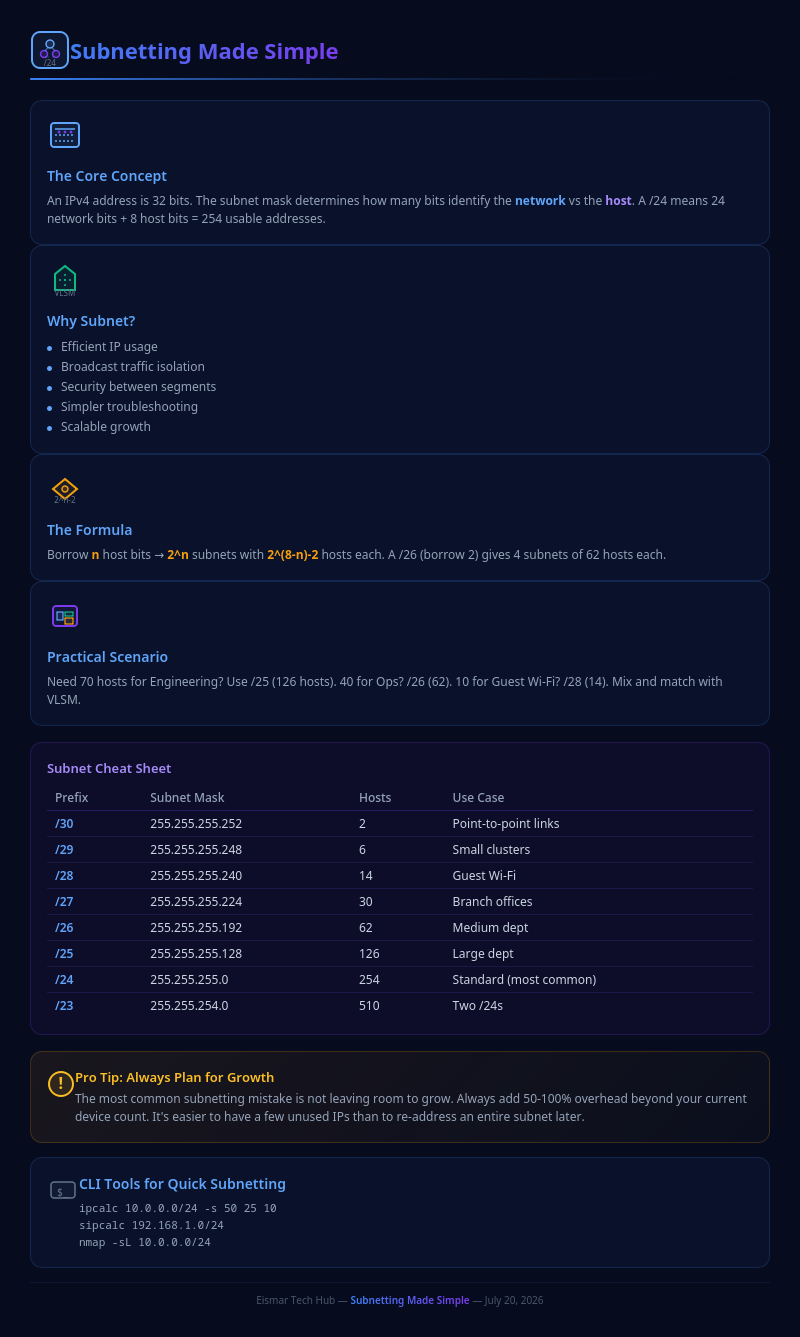
Infographic: Subnetting Made Simple

💬 0 Comments