Open your Instagram or X feed this week and you will see the same thing everywhere: perfectly ordinary people suddenly sporting feathered hair, oversized blazers and a soft-focus studio glow, as if someone raided a 1985 family album. It is all AI. Millions of users have spent the past few days feeding selfies into ChatGPT and Gemini and asking one simple question — what would I have looked like in the 1980s?
The trend is fun, it is fast, and it is genuinely impressive when it works. It is also a lot less random than it looks. The difference between a result that stops you scrolling and one that looks like a bad costume filter comes down to a handful of choices: the source photo you pick, the structure of your prompt, and the model you run it on. And once the photo lands in your gallery, there are two hidden costs nobody talks about at the dinner table — your face, and the planet's electricity bill.
Let's break down the whole thing: why this decade took over, the four-part prompt formula that actually works, the mistakes that give the game away, and how to enjoy the trend without handing over more than you meant to.
Why the 1980s, and Why This Trend Hit So Hard
Era-makeover trends are not new. We have already lived through Studio Ghibli-style portraits, "yearbook photo" filters and countless "what would I look like as a Renaissance painting" phases. So why did the 1980s specifically ignite feeds this September?
The answer is that the 1980s has a photographic signature that AI image models render extremely well. The decade's look is unmistakable and easy to describe: direct on-camera flash, film grain, slightly faded warm colour, mottled studio backdrops, bold silhouettes and statement accessories. Unlike a subtle "make me look like an oil painting" request, an 80s makeover has a checklist of visual cues — and each cue nudges the model decisively in the right direction.
There is also a cultural reason. The 80s studio portrait is a format almost everyone recognises from their own family's photo box. When you see a friend dropped into that world, the nostalgia hits instantly — and nostalgia is the most shareable emotion on social media. From retro family-album recreations to Bollywood-style portraits, the format travels across languages and cultures, which is exactly why it spread from regional Indian feeds to a global trend within days.
The result: a trend that took over Instagram posts and Reels, and even pulled in public figures who would normally never post AI images of themselves.
The Prompt Is the Whole Game: The Four-Part Formula
Here is the single most useful thing to know about this trend. The prompts that produce convincing results — not a generic "vintage filter" look — all follow the same four-part structure, and the order matters:
- Identity lock. The instruction to preserve your actual face is named first, always. This tells the model exactly which features must stay recognisable before anything else changes.
- Hair and clothing. This is where the visible "80s-ness" comes from — period-accurate, expressive styles and bold accessories.
- Photographic texture. Direct flash, film grain, faded warm colour. This is what separates "a person in a costume" from "a photo actually taken in 1985."
- Backdrop. A period-appropriate studio or environment — a mottled backdrop or an interior that reads as authentically mid-decade.
OpenAI itself shared a recommended version of this prompt in the blog post introducing its Images 2.5 model. The key instruction focuses on holding your identity steady while changing the styling, surroundings and photographic treatment to evoke a photograph from around 1985 — preserving your facial features, skin tone, age and recognisable appearance, then reimagining hair, clothing, accessories and surroundings with bold, unmistakably mid-1980s styling.
The practical takeaway is simpler than the wording: lock the face before you style the scene. Models treat the first strong instruction as the anchor. If you lead with "make me look like the 80s" and mention your face somewhere at the end, you are effectively asking for a retro aesthetic and hoping your identity survives the trip. Lead with the face, and the styling becomes a costume change instead of a full replacement.
The Six Mistakes That Expose an AI Retro Photo
Once you have the structure, most of the remaining failures come from a short list of avoidable errors:
- The instruction is too broad. Simply asking a tool to make an image "look like the 80s" produces a generic retro effect with none of the specific detail that makes the decade recognisable. Detail is the difference between an era and a filter.
- Lighting and texture are missing. Leave out direct flash, grain and colour treatment and the image reads as a modern photo with a sepia wash.
- Facial consistency is an afterthought. If the prompt does not clearly prioritise your original appearance, the output drifts into an overly stylised face that no longer looks like you.
- Modern elements sneak in. Smartphones, contemporary clothing and digital-looking backgrounds instantly break the illusion.
- Your face gets "beautified." This is the most common complaint — a face that looks like a generic AI portrait rather than you. The fix is an explicit negative instruction: tell the model not to smooth or beautify your skin, and start from a sharper source photo.
- The hair looks like a costume wig. This usually happens when the prompt describes a generic 80s hairstyle unrelated to your actual hair. Specify your current length and texture, then ask for a period style matched to it.
Choosing the right input photo matters just as much as the words. A clear, front-facing, well-lit shot works best. Blurry, angled or heavily filtered selfies give the model more room to improvise — and improvised faces rarely look like you.
Choosing Your Tool: ChatGPT vs Gemini vs Grok
The same four-part prompt behaves differently depending on which model runs it. Based on the comparisons circulating this week:
| Tool | Identity preservation | 80s texture (flash/grain) | Common miss |
|---|---|---|---|
| Gemini (Nano Banana) | Strong — face structure usually holds first try | Good film grain | Clothing can look slightly synthetic; over-smooth skin if you drop the negative line |
| ChatGPT (image edit) | Variable — sometimes drifts toward generic beauty | Strong studio-flash look when prompted explicitly | May "filter" instead of fully re-rendering the scene |
| Grok Imagine | Hit-or-miss depending on the photo | Decent | Worth testing with the same prompt to compare |
The genuinely useful habit here: run the identical prompt in two tools and pick whichever result actually looks like you. Identity preservation varies by model, and a trend built entirely on "does that still look like me?" rewards a little comparison shopping. Google also announced Google Pics on September 1, 2026 — a new AI image creation and editing app built on its Nano Banana 2 model — so expect the toolset to keep expanding.
The Part Nobody Mentions: Your Face Is the Input
Here is where the fun gets serious. To get that retro look, you have to hand over a clear, well-lit photo of your face — and often several attempts. That photo is not just a picture. Security researchers have been warning for months that high-resolution selfies carry more than a nice memory: facial geometry, skin texture and even fingerprint ridges visible in close-up shots can, in the wrong hands, be extracted and reused.
The uncomfortable part is that unlike a password, a face cannot be reset. Once a biometric template is out there, you cannot rotate it. And the bigger worry for most experts is not a hacker stealing a single image — it is what the platforms themselves do with it. Many users assume the photo disappears the moment the tool returns a result. In reality, some platforms retain uploaded images, and few people read the terms closely enough to know whether a selfie uploaded for fun could end up training the next version of the model. OpenAI has itself issued a warning to users about what they upload for this trend. Regulation, meanwhile, is patchy at best; outside a handful of specific laws, there is no strong general rule preventing the reuse of a selfie you handed over for entertainment.
None of this makes the trend dangerous by default. It does mean the smart move is to treat your face as data — because that is exactly how the system treats it.
The Environmental Tab: 0.01 to 0.29 kWh per Image
Then there is the cost that leaves no trace on your screen at all. Every AI-generated picture is processed inside a data centre, where specialised hardware burns electricity and produces heat that must be cooled — often with water.
Research cited from Carnegie Mellon University and Hugging Face estimates that generating a single AI image can consume anywhere from 0.01 to 0.29 kilowatt-hours of electricity, depending on the system and generation process. That range is deliberately wide, and it is not a claim that every ChatGPT image costs 0.29 kWh. The point is the physics behind the range: image generation takes meaningfully more computing power than answering a text question, so a trend built entirely around pictures is heavier on infrastructure than an ordinary chat.
One image barely registers. The problem is scale. When millions of people generate photo after photo, chasing the perfect version and discarding the rest, small costs compound fast. The International Energy Agency expects global data-centre electricity consumption to more than double by 2030, and MIT figures show North American data-centre power requirements climbing from 2,688 megawatts at the end of 2022 to 5,341 megawatts a year later. Water consumption is harder to pin to a single image, but AI-linked data centres in the US are projected to add billions of gallons a year. Climate researchers are blunt that AI's footprint is one factor among many pushing emissions up — but unlike most of the bigger contributors, this one is a lever individuals can actually choose to pull.
How to Enjoy the Trend Without the Regret
You do not have to sit this out. A few habits keep it fun and low-regret:
- Use a benign source photo. Pick a shot that is already public and does not expose your full biometric profile — avoid close-up, high-resolution passport-style images.
- Check your data settings first. Look for the option to opt out of having your uploads used for model training, and read what the tool says it does with your images.
- Batch your generations. Decide what you want before you start, and avoid burning a dozen attempts chasing a marginal improvement.
- Compare, don't loop. Testing two tools once beats regenerating twenty times in one.
- Download and delete. Save the result you like, and clear uploads or conversations containing your source photo where the tool allows it.
- Treat the output as what it is. A fun synthetic portrait, not a document — do not use it for anything that requires proof of identity.
The Takeaway
The 1980s AI photo trend is a genuinely great use of modern image models: nostalgic, personal and shareable. It also happens to be a compact lesson in how to use AI well. Prompt with structure — identity first, styling second, texture third, scene last. Understand that your face is the most sensitive input you will ever type. And keep half an eye on the fact that a picture that appears instantly still costs energy somewhere out of sight.
Do that, and the retro portrait on your feed is not just a fun trend. It is a smart one.
Have you tried the trend yet? If you are still getting generic faces instead of your own, revisit the prompt order — that is where nine out of ten attempts go wrong.
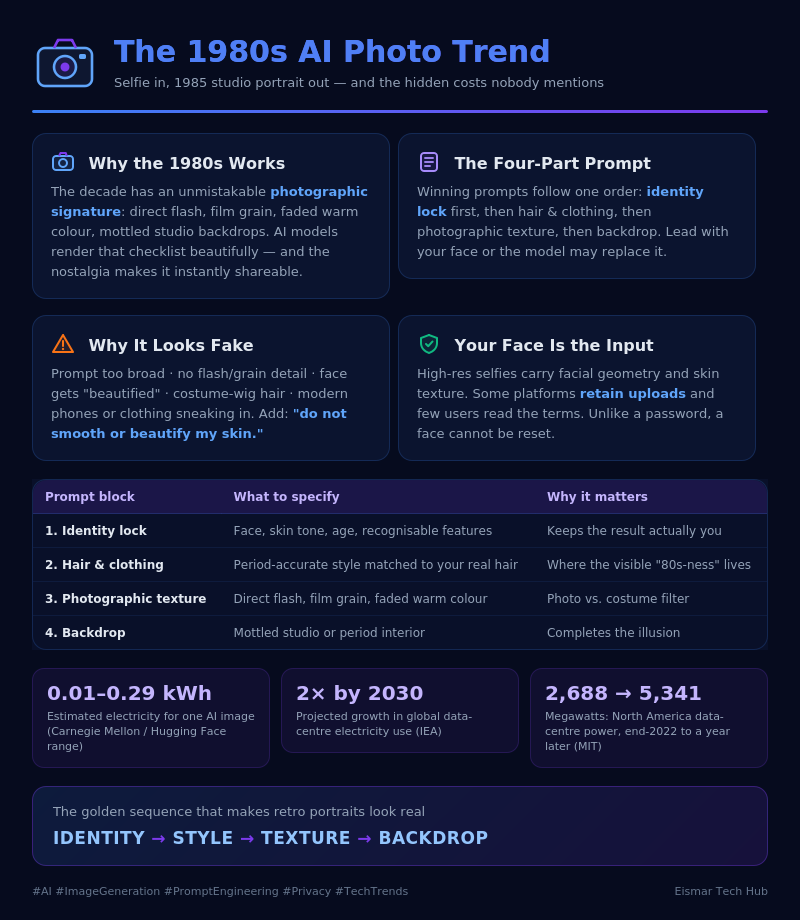
Infographic: The 1980s AI Photo Trend
💬 0 Comments