Let me paint you a picture. It's Friday evening, you're about to wrap up, and you need to jump into `/var/www/html/tech/data/` one more time. You type `cd /var/www/html/tech/data/`. Again. For the 47th time this week.
We've all been there. The humble `cd` command has served us well for decades, but let's be honest — navigating deep directory trees by remembering every path is a mental tax nobody should be paying. Enter zoxide — the `cd` replacement that learns your habits and teleports you where you want to go.
I switched to zoxide last weekend, and after seven days of daily use, here's my honest take.
What Is Zoxide?
Zoxide is a smarter `cd` written in Rust — fast, cross-platform, and self-learning. Instead of typing full paths, you type fragments of directories you've visited before, and zoxide's frecency algorithm (frequency + recency) magically puts you in the right place.
```bash
Instead of this:
cd /var/www/html/tech/data/
Just type this:
z dataOr even just this if you visit it often:
z tech data ```It works on Linux, macOS, Windows (via PowerShell), and integrates with every major shell — Bash, Zsh, Fish, even Nushell. One binary, zero config needed to get started.
The 30-Second Install
If you have Rust's Cargo installed, it's one line:
```bash
cargo install zoxide
```
But if you don't (or you want the fastest path), use the official installer:
```bash
curl -sS https://raw.githubusercontent.com/ajeetdsouza/zoxide/main/install.sh | bash
```
Then add one line to your `.bashrc` or `.zshrc`:
```bash
eval "$(zoxide init bash)" # or zsh, or fish
```
That's it. Restart your shell and start navigating normally — zoxide is quietly building its database in the background. No learning curve because it works exactly like `cd` until you start using its special features.
The biggest gotcha I hit: don't forget to remove the old `eval "$(zoxide init bash)"` if you're upgrading from `z` (the predecessor). They clash because both want the `z` command.
What Makes It Special?
1. Fuzzy Matching That Actually Works
Type `z conf nginx` and zoxide figures out you mean `/etc/nginx/conf.d/` — even though you didn't type any of it correctly. It's not just prefix matching; it's interactive substring matching that learns from context.
```bash
Both of these take you to the same place:
z nginx conf
z conf nginx
```
The order doesn't matter. Zoxide scores paths by how recently and how frequently you've visited them, so `/etc/nginx/conf.d/` floats to the top if that's where you spend your time.
2. Interactive Mode (The Best Part)
Running `zi` (interactive mode) opens a fzf-style selector that shows you the top 10 matches so you can pick with arrow keys. This is a game-changer when zoxide can't decide between `/home/projects/api/` and `/home/projects/api-docs/`:
```bash
zi api
↓ Shows a picker:
1. /home/projects/api/
2. /home/projects/api-docs/
3. /var/log/nginx/api.eismar.com/
Pick one with arrow keys + Enter
```
No more `Tab`-bing through autocomplete guesses. It's visual, fast, and oddly satisfying.
3. Directory Aliases on Steroids
Want `/var/log/nginx/` to be accessible as just `logs`? Just visit it once, and zoxide remembers. But if you want permanent aliases:
```bash
zoxide add /var/www/html/tech/data/ # manually add to DB
zoxide remove /old/dead/project/ # remove junk
```
I used this to seed zoxide with my 12 most-visited directories on day one. After that, I never typed a full path again.
Who Should Use It?
| You're ... | Zoxide is ... |
|---|---|
| A sysadmin jumping between `/etc/`, `/var/log/`, `/var/www/` | ✅ A massive time saver |
| A developer with deep project trees | ✅ Perfect match |
| Someone who uses `cd` more than 20 times daily | ✅ Buy it dinner first |
| A casual terminal user who visits 5 directories | ❌ Overkill, stick with `cd` |
Real talk: if you only visit the same 3 directories all day, `cd ~/projects` and `cd -` are enough. But if your terminal workflow involves hopping between logs, configs, project directories, and temp folders, zoxide will save you seconds per jump — which adds up to minutes per day, which is hours per year.
The One Thing I Don't Love
Zoxide's database lives in `~/.local/share/zoxide/db.zo` — a binary file. You can't grep it, you can't `cat` it, you can't easily back it up as plaintext. If your home directory gets wiped, your navigation history goes with it.
Workaround: Run `zoxide add ~/projects ~/Documents /var/www` after a fresh setup to rebuild your most important paths manually. It only takes 10 seconds, but it's something you need to remember.
Verdict: Is It Worth the Switch?
Yes — but only if you commit for a week.
The first two days felt weird. I kept typing `cd` out of muscle memory. But by day three, `cd` started feeling clunky and slow. By day five, I installed it on my work laptop too. By day seven, I found myself typing `z` on servers that don't have it installed — the ultimate sign of adoption.
Zoxide isn't life-changing. It's keystroke-changing. It saves you maybe 3–5 seconds per navigation. But when you navigate directories 50+ times a day, that's 2–4 minutes saved. Across a year? That's hours of your life back.
And honestly, anything that removes friction from your terminal workflow is worth investigating. Give it a weekend — you might not switch back.
Have you tried zoxide or any other `cd` replacement? Drop a comment below or hit me up. There's nothing IT people love more than debating terminal tools 😄
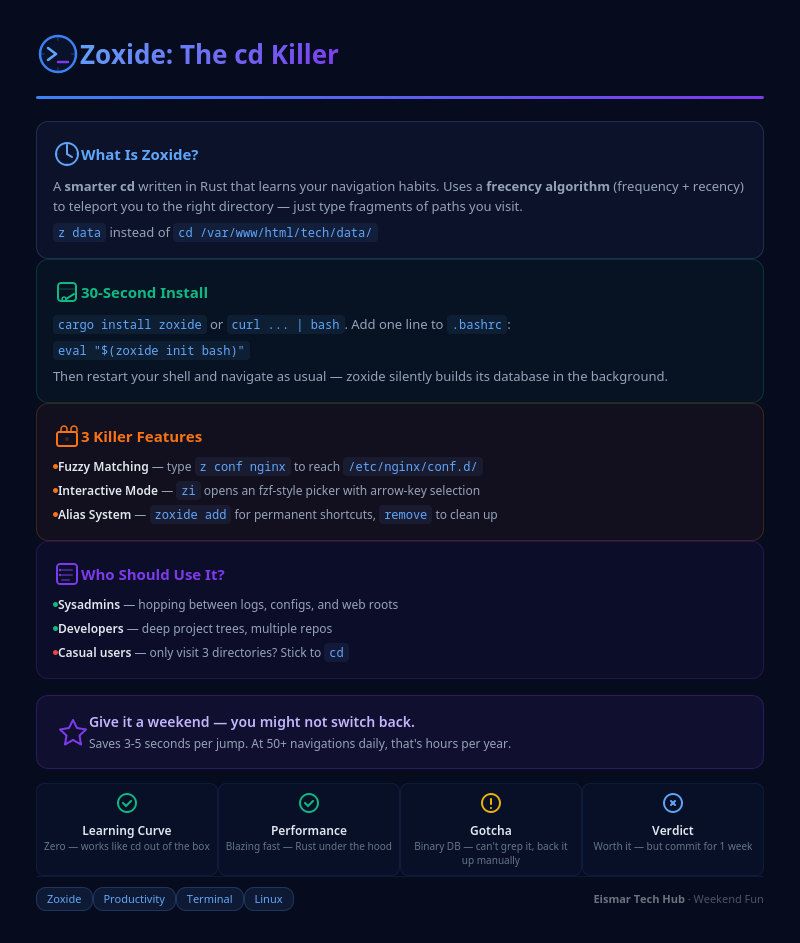
Infographic: Zoxide - The cd Killer

💬 0 Comments