The year is 2026, and artificial intelligence has become as ubiquitous as electricity. From drafting code to diagnosing medical images, AI assistants are woven into the fabric of daily business and personal life. But a critical fork in the road remains: Do you run your AI workloads in the cloud, or do you bring them home to your own hardware?
This isn’t just a technical debate anymore—it’s a strategic decision that impacts latency, privacy, cost, and even your company’s carbon footprint. Let’s break down the state of Cloud-Based AI versus Local Host AI in 2026, weigh the pros and cons, and help you decide which path to take.
The State of Play in 2026
In 2026, the AI landscape has matured dramatically. Cloud providers like AWS, Azure, and Google Cloud offer specialized AI chips (TPUs, Trainium, Inferentia) that can train and infer at blistering speeds. On the local front, consumer and enterprise hardware has caught up: Apple’s M4 Ultra, AMD’s Ryzen AI 9000 series, and NVIDIA’s RTX 6090 GPUs now pack enough VRAM (up to 48GB on consumer cards) to run large language models locally.
The key shift? Edge AI has become mainstream. Models like Llama 4, Mistral Large, and even specialized vision transformers can run entirely offline on a high-end laptop or a modest server rack.
Cloud-Based AI: The Powerhouse
Key Advantages
| Feature | Cloud AI (2026) |
|---|---|
| Compute Power | Virtually unlimited. Access to 1000+ GPU clusters. |
| Model Variety | Full access to cutting-edge GPT-5, Claude 4, Gemini Ultra. |
| Scalability | Instant scaling for burst workloads. |
| Maintenance | Zero hardware upkeep. Provider handles updates. |
| Collaboration | Built-in sharing, versioning, and API endpoints. |
When to Choose Cloud
- Training massive models – If you’re fine-tuning a 700B-parameter model, local hardware is simply not feasible.
- Bursty workloads – Need 10,000 inferences per second for 30 minutes? Cloud auto-scales.
- Team collaboration – Multiple users need simultaneous access to the same AI agent or dataset.
- Regulatory compliance – Some cloud providers now offer air-gapped regions with on-premise-like privacy guarantees.
The Downsides
- Latency – Even with 5G, round-trip time to a data center adds 20–50ms. For real-time applications (e.g., autonomous vehicles, live translation), this is a dealbreaker.
- Cost unpredictability – API pricing can spike. A runaway loop in your automation pipeline can rack up thousands in minutes.
- Data sovereignty – Even with encryption, some industries (healthcare, defense) cannot send data off-site.
Local Host AI: The Private Workhorse
Key Advantages
| Feature | Local AI (2026) |
|---|---|
| Latency | Sub-millisecond. Real-time responses guaranteed. |
| Privacy | Data never leaves your device or network. |
| Cost | One-time hardware cost. No recurring API fees. |
| Offline | Fully functional without internet. |
| Customization | Full control over model quantization, pruning, and fine-tuning. |
When to Choose Local
- Real-time applications – Voice assistants, autonomous drones, industrial robotics.
- Sensitive data – Legal, medical, or financial documents processed in-house.
- Budget predictability – A $5,000 workstation runs for years with no usage-based charges.
- Edge scenarios – Remote oil rigs, military outposts, or rural clinics with poor internet.
The Downsides
- Hardware investment – High upfront cost. A capable local AI rig (e.g., dual RTX 6090, 128GB RAM) costs $8,000–$15,000.
- Model limitations – You cannot run the largest frontier models locally. Llama 4 70B fits on a single GPU, but GPT-5 1.7T does not.
- Maintenance – You handle driver updates, thermal management, and hardware failures.
- Energy consumption – A full-power local rig can draw 800W+ under load, increasing electricity bills and cooling needs.
The Hybrid Approach: Best of Both Worlds
In 2026, most enterprises don’t choose one or the other—they adopt a tiered strategy. Here’s a common architecture:
- Local inference for everyday tasks – Running a 7B-parameter model (e.g., Mistral 7B v4) on a laptop for email drafting, code completion, and document search.
- Cloud for heavy lifting – Sending complex reasoning tasks, large-scale data analysis, or model training to the cloud.
- Edge caching – Frequently used cloud model outputs are cached locally to reduce latency and cost.
This hybrid model is now supported natively by platforms like Hugging Face’s `transformers-edge` and AWS’s Local Zones.
Cost Comparison: 3-Year Total Cost of Ownership
Let’s compare a typical small business scenario: 5 users running an AI assistant for customer support, code generation, and document summarization.
| Cost Factor | Cloud-Only (2026) | Local-Only (2026) | Hybrid |
|---|---|---|---|
| Hardware | $0 (BYOD) | $25,000 (workstation + GPU) | $15,000 (mid-range local + cloud credits) |
| Cloud API (3 years) | $72,000 ($2k/month) | $0 | $36,000 ($1k/month) |
| Electricity (3 years) | $0 | $4,320 (300W avg) | $2,160 |
| Maintenance | $3,600 (support plan) | $3,000 (parts + labor) | $2,400 |
| Total | $75,600 | $32,320 | $55,560 |
Verdict: Local-only is cheapest over 3 years, but only if your workload fits within hardware limits. Hybrid offers the best flexibility for growing businesses.
Security and Privacy: The Elephant in the Room
By 2026, data breaches involving cloud AI have made headlines. A major incident in 2024 saw a healthcare provider’s cloud AI accidentally expose 2 million patient records. This has driven many organizations to local solutions.
However, local AI is not immune to risk. Physical theft of a laptop containing a fine-tuned model is a real threat. The solution in 2026 is hardware-backed encryption (e.g., Apple’s Secure Enclave, TPM 2.0) combined with model watermarking.
Best practice: Use local AI for training on proprietary data, then deploy the quantized model to the cloud for inference with differential privacy enabled.
Conclusion: Your 2026 AI Strategy
There is no universal winner. The right choice depends on your specific latency requirements, data sensitivity, budget, and scalability needs.
- Choose Cloud if: You need access to the largest models, have unpredictable workloads, or prioritize zero hardware management.
- Choose Local if: You require sub-10ms latency, handle PII/PHI data, or want to avoid ongoing API costs.
- Choose Hybrid if: You want to optimize for cost and flexibility, or you’re scaling a business that will grow into new use cases.
My recommendation for 2026: Start with a hybrid approach. Deploy a local model for your core, latency-sensitive tasks, and use the cloud as a safety valve for peak demand and bleeding-edge model access. As hardware continues to improve, you’ll find yourself moving more workloads local over time.
The AI revolution is here, but you get to decide where it lives. Choose wisely.
What’s your setup in 2026? Are you all-in on the cloud, or have you built a local fortress? Share your experience in the comments below.
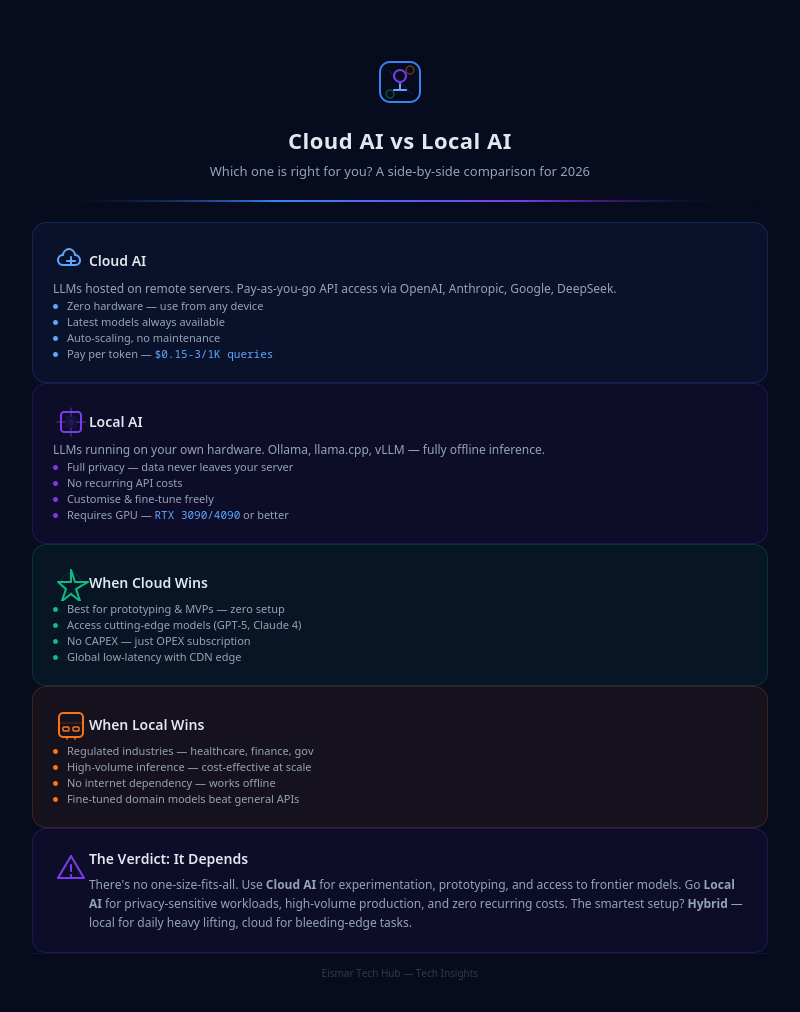
Infographic: Cloud AI vs Local AI

💬 0 Comments